Monday, December 10, 2012

TUNNEL GURU VPN CLIENT

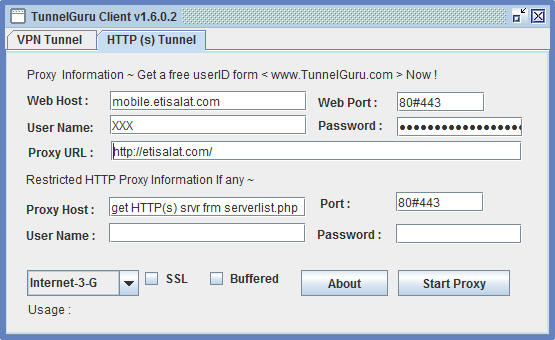
You guys remember IWP right?? Yeah we all do. Those were the good times. This new program is developed by the same people i guess, whatever the case they got the same site. Who Cares. The name is TunnelGuru, its kinda like a doppelganger of pd proxy with all the protocols:: UDP, TCP, ICMP and also got HTTP(S) tunnel (just like IWP) which makes it great don't u think, but there is always a catch.

Well you could register for free but they got plans for the accounts. You can pay by LR (Liberty Reserve)...Our Nigerian friends got it to work with their networks and they claim they get more than 300kb/s with it...So anyways this is just a heads up...It gives you a 5mb data on free accounts only specific to their website for testing. I know that's funny, well what are you gonna do...its just for testing!!

Check out the forum for configuration help on Main site..So now the ball is in you court. We could all help to make it work in Gh or we could all depend on one person and watch the time pass us by. Who loses, maybe you!! That's suppose to be funny if you didn't get the joke.


VPN TUNNEL


HTTP(S) TUNNEL


Linksweb-tunnel or tunnelguru
All links goto the same site!!

Sunday, December 2, 2012

MAKE MONEY ONLINE JUST AS EASY

Are you in dire need of cash, look no further. There are vast uses of the internet of which making money online is just as easy. Follow the link below to sign up and start earning cash. This is fool proof. "skip ads"
http://adf.ly/FVZ1A

Thursday, October 4, 2012

OCTOBER - FEST GLO FBT 2012

Follow the instructions below to enjoy 3g browsing on Glo.
I've made this as simple as it could possibly be. So please don't be chasing me down on fb claiming you don't follow. Limit whatever you do for it not to be blocked cos am actually risking it posting it here


  • Install the necessary drivers...Click Tools =>Drivers
  • Install TAP0901 and TAPHSS


  • Click Tools =>Options
  • Deselect the following:
           -Auto-flush DNS
           -Run on Windows Start Up


  • Now select -RAS Dialer and click on the green plug to the right side to add


 Select Device Name - Huawei Mobile Connect
  Profile Name: GLO
  Access number: *99#
  Select: PAP
  Creat the connection and click on "OK" on Options


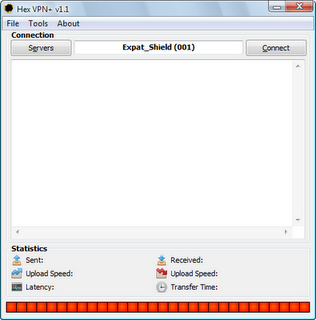
  • Click on "Servers". Choose a server from Hotspot Shield (US) or EXpat Shield (UK)
  • Modem will be connected upon clicking "Connect". WAit till "Initialization Sequence completed" is displayed in the log.


  • N/b: Do not connect modem manually. 
  • Choose no proxy in Firefox and IDM and FiRe AwAy. Download all You Want.

Credits: "Kudos to Hatzonne1 of Wap3ers Fame"

Saturday, September 29, 2012

MTN FBT OCTOBER 2012

Was just working on one of our networks about 12 hours ago with one "apn" am currently attached to and came to a realisation that there was actually something fishy going on with that particular network. The trick was working with that "apn" but now it seems to be working for all "apn's", there are exceptions of course. Hopefully one trick i used connected alright but there ain't any incoming connection which makes it weird and situation worse. Other one fluctuates everytime upon connection, meaning it usually disconnect with server connection lost displayed. I think there is a chance with this trick cos as it connected i was able to browse for a while and downloaded a 7mb file before it went back "dead".

Am trying to work out some issues with it and hopefully i will be updating this page with the outcome. Pray for luck.
                                                                                                                                           
IF most of us haven't recognized this yet, our dear proxy cheat works with no credit on mtn for a while before going dead. This trick am about to show you, none should attempt with credit else you will regret it. I've been doing some up and downs with softwares, ip's and ports lately. Now the tricks am about to post here is not 100% cooked, take it as a 75% chance to success. They are "UNSTABLE" which connection fluctuates much often... I need hands on them to perfect it. So here goes nothing::::

N/B: USE ANY APN TO CONNECT WITH THE TRICKS PROVIDED. JUST GO FOR WHATEVER YOU WANT.

1. ULTRASURF:
This is a software which doesn't need any installation, you just download the executable file and run it.
There are other advantages to this software so try figuring it out.


Click on "Options" and choose "Directly use Ultrasurf". Click OK and in a few seconds it will be connected to server. Point your browser to Proxy: 127.0.0.1 Port: 9666 or better still it opens Internet Explorer upon connection to the server, so no proxy in I E.


2. PD- PROXY
Yes our very own pd-proxy connects to mtn on both "TCP" and "UDP". I don't think i need to say much on this cos you already know how this turns out.


 Creating accounts, blah blah blah...dnt have time for this!!

With this i was able to browse with "TCP" and downloaded that data i said above till it disconnected and reconnected.
On the other hand "UDP" connected perfectly but with no incoming connection.
Keep trying both protocols and with ip's and ports to make it stay connected without disconneting.


3. JAP / JONDO
This is an anti-censorship program which also bypasses restrictions by internet service providers and countries like china to access contents which by nature has been banned by them.

a. Download the software above, make sure u got java installed on your system
b. Open the shortcut created on desktop, click on "Config"
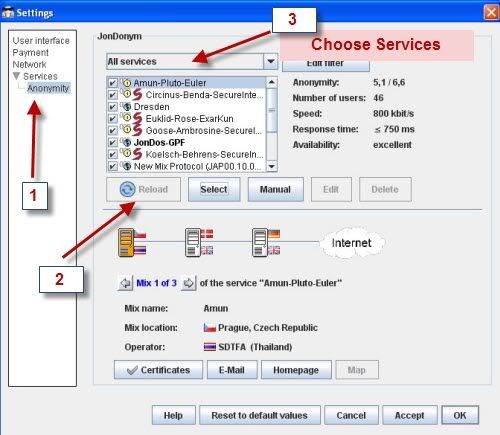
c. Click on "Anonymity" on the left pane and click "Manual" to enter Host and port


d. Input this into Host and port each time by clicking "Ok" and hitting "Manual" back again:::
       Host: 141.76.45.33
       Port:443
                    Host: 91.184.37.67
                    Port:443
                                   Host: 93.152.146.220
                                    Port: 8888
e. Click on "Accept" and "Ok" at the bottom after all that.
f. Push back Anonymity to "ON" if its "Off" and wait for some few seconds to be connected. Select the option to restart Jondo when prompted after clicking Accept.
g. Point your browser to PROXY: 127.0.0.1 PORT: 4001

Note: Again they ain't 100% fool proof...trying with ip's and port here and there could help make it stable. In my own point of view, sticking to IP's on port 80 could ensure better results. You could also try the other, anyways whichever one makes it solid!!!

drop down ur comments below

Thursday, July 26, 2012

DISCUSSION JOINT

You know the usual drill... This place is all about the cheat...Yeah i know, we get that, any new surprises...HELL NO!! Its good to have some interests in common but other times different interests and talks on other matters help to get along much better. If you don't agree with me, KILL YOURSELF. "JUST JOKING HERE" This place is a two way street. I believe most are familiar with the concept of "Hand Go,  Hand Come" You don't pocket what you got and always try to get what another has. Remember All Greedy People Die.

For a fact when i was writing this, i was even laughing. Anyways back to the point of this post. I believe most of the cheat are working as at now. We thank God for that anyways, but we need a frequent flow of cheat, don't you think? So, this new post concerns about ideas we have on anything for discussion!! It could be a plan for a new cheat, or maybe you got a lead in creating a cheat, yet you are stuck somewhere on the way or atleast anything in general which is not specifically stated here. "Added that so someone would get off my case"

Just be creative enough and put something together!!

Monday, July 9, 2012

MTN PHOTO CONTEST

Guys do me the honour of liking my pic on the MTN PHOTO CONTEST page. i want 500 likes in all so you can tell your friends to also help out with that... The pic is the same as on my facebook badge...Anyone who contributes to this will be thanked in a SPECIAL WAY...Stay blessed

This is a new link to the page:MTN PHOTO CONTEST
or MTN PHOTO CONTEST LINK 2 or just search for "mtn photo contest" in facebook search...

Sunday, June 24, 2012

MTN AND AIRTEL GHANA FBT

Thanks to "Dadabee of Ghanawap Fame" now we got mtn and airtel cheat to browse for free. Two networks, atleast a third in addition working at the same time. Its indeed a blessing cos such a thing hasn't happened for quite a while now!! If it works for you give thanks to God and Dadabee...
 I DIDN'T ALTER ANYTHING FROM THE ORIGINAL POST...

***MTN INBUILT BROWSER TRICKS***

Use any of the following Tricks
>Ip=www.lookingforvpn.com or 173.213.109.225
Port=80
Apn=internet
Homepage=0.facebook.com
Surf tru the url in the site it opens then Go!

>Ip=Darkbrowsing.com or 209.97.221.88
Port=80
Apn=internet
Homepage=0.facebook.com
Surf tru the url in the site it opens then Go!

>Ip=german-proxy.de or 62.75.138.253
Port=80
Apn=internet
Homepage=0.facebook.com
Surf tru the url in the site it opens then Go!

<<NOTE>>:YOU NEED ATLEAST SMALL CREDIT ON UR PHONE TO MAKE IT WORK.Enjoy


***AIRTEL INBUILT BROWSER TRICKS***

Use any of the following Tricks
>Ip=www.lookingforvpn.com or 173.213.109.225
Port=80
Apn=internet
Homepage=0.facebook.com
Surf tru the url in the site it opens then Go!

>Ip=Darkbrowsing.com or 209.97.221.88
Port=80
Apn=internet
Homepage=0.facebook.com
Surf tru the url in the site it opens then Go!

>Ip=www.insuprox.com or 69.64.49.253
Port=80
Apn=internet
Homepage=0.facebook.com
Surf tru the url in the site it opens then Go!

>Ip=www.goozhan.com 199.19.105.156
Port=80
Apn=internet
Homepage=0.facebook.com
Surf tru the url in the site it opens then Go!

N/B: THIS CHEAT WAS WORKING AS AT THE TIME OF THIS POST
With airtel no credit is needed...jux browse with 0.00p or whatever!!
Just search for proxies on google if these ones are working slow or not to your satisfaction. Once again don't go selling this cheat. And keep the distribution to a minimum for the cheat to last longer.