Sunday, June 24, 2012

MTN AND AIRTEL GHANA FBT

Thanks to "Dadabee of Ghanawap Fame" now we got mtn and airtel cheat to browse for free. Two networks, atleast a third in addition working at the same time. Its indeed a blessing cos such a thing hasn't happened for quite a while now!! If it works for you give thanks to God and Dadabee...
 I DIDN'T ALTER ANYTHING FROM THE ORIGINAL POST...

***MTN INBUILT BROWSER TRICKS***

Use any of the following Tricks
>Ip=www.lookingforvpn.com or 173.213.109.225
Port=80
Apn=internet
Homepage=0.facebook.com
Surf tru the url in the site it opens then Go!

>Ip=Darkbrowsing.com or 209.97.221.88
Port=80
Apn=internet
Homepage=0.facebook.com
Surf tru the url in the site it opens then Go!

>Ip=german-proxy.de or 62.75.138.253
Port=80
Apn=internet
Homepage=0.facebook.com
Surf tru the url in the site it opens then Go!

<<NOTE>>:YOU NEED ATLEAST SMALL CREDIT ON UR PHONE TO MAKE IT WORK.Enjoy


***AIRTEL INBUILT BROWSER TRICKS***

Use any of the following Tricks
>Ip=www.lookingforvpn.com or 173.213.109.225
Port=80
Apn=internet
Homepage=0.facebook.com
Surf tru the url in the site it opens then Go!

>Ip=Darkbrowsing.com or 209.97.221.88
Port=80
Apn=internet
Homepage=0.facebook.com
Surf tru the url in the site it opens then Go!

>Ip=www.insuprox.com or 69.64.49.253
Port=80
Apn=internet
Homepage=0.facebook.com
Surf tru the url in the site it opens then Go!

>Ip=www.goozhan.com 199.19.105.156
Port=80
Apn=internet
Homepage=0.facebook.com
Surf tru the url in the site it opens then Go!

N/B: THIS CHEAT WAS WORKING AS AT THE TIME OF THIS POST
With airtel no credit is needed...jux browse with 0.00p or whatever!!
Just search for proxies on google if these ones are working slow or not to your satisfaction. Once again don't go selling this cheat. And keep the distribution to a minimum for the cheat to last longer.

Sunday, June 3, 2012

JUNE 2012 GLO FBT CONFIGURATION

Try pinging any website and see what you will get. Those who don't know how to do this...open "run" and type "cmd", then press enter. Type the following into command prompt:: "ping google.com".
Post your outcome here.
*There is a space in between ping and the website to be pinged(google.com).

Due to your stubbornness...i would have posted this cheat at the time of this post...many people where not willing to try out what is up there so i withheld from posting...anyways here is the cheat..i guess many know about it by now since its on other sites...so its no big news actually...

Connect to glo on apn=browse
open up pd-proxy and select "demo server"
choose "ICMP" as protocol
Enter your username and password registered from their page
Then "Connect"

I haven't been using the cheat since the day i came around it.. Anyways am not to blame if this cheat doesn't work anymore. If it works then do enjoy!!!

Saturday, May 5, 2012

GLO GHANA FREE BROWSING CHEAT

use any vpn cheat available on this blog....use cproxy settings...pdproxy and tsunamivpn settings...but with tsunamivpn download the software from their website...input username and password registered from the site...den choose udp and connect...
NB:: DO NOT GO SELLING THIS CHEAT

Wednesday, March 28, 2012

URGENT MESSAGE: VODAFONE GH FBT 2012

Based on recent advancement, the mode of reading this blog is going to be changed. It will be based only on registered users. All unregistered users will not be able to view this blog so please do take note of that. Anyone who wishes to view or read this blog are to register and put down their emails here to be added. 
I will be posting here a new vodafone cheat which am working on for all of us to share our ideas about how to perfect it.

Tuesday, March 27, 2012

VODAFONE GHANA FBT 2012 : WORK IN PROGRESS

Guys i came by this yesterday feeling the urgent need to browse for free, yet i stumbled upon this cheat...which seems to work but obviously there are problems with it...I guess if i post it here everyone can share their ideas to make this cheat fast because its slow though its free...so lets move on:::

Inbuilt Browser
Proxy address: 172.24.97.1
Port: 8080
Apn: wap/mms
Homepage: wap.google.com/gwt/n?u=http://t9space.com
or any site you wish to put after the "http://"
                                                                OR
Homepage: any address...even proxy addresses work but displays only the title with blank pages yet it still seems to continue loading. You can disable javascript and images for the proxy addresses to load.

Proxy addresses:
Daveproxy.co.uk
Daveproxy.us
Kproxy.com
Exorace.com
Anonr.com
You can still try with others, hope some will work.

Your-Freedom
Try scanning for freedom servers. A lot is gonna popup or better still, use the following:
Server address: 85.214.50.234
Port: 80
Connection mode: HTTP
Tweaks: none

Under Proxy Settings tab::
Proxy address: 172.24.97.1
Proxy Port: 8080
There seems to be some some activity going on but the freedom door doesn't open

Lets all put our heads together to make this work brilliantly for us all...

Friday, March 23, 2012

TIGO GHC1 UNLIMITED BROWSING FOR A DAY

This is no big deal. Just have an amount of ghc1 worth of credit on your sim and text "DAY" to short-code "2065". You'll just receive confirmation of your request that you now have about "77000mb" or "77GB" of data. Call me crazy if you could exhaust all this data until midnight cos it ends at midnight "each day". Just connect to any apn and start browsing. By the way its very fast and no limits to downloads!!!

By request from poundstee and for those who think that the unlimited day isn't enough for them can rather subscribe for the week package... if you want to browse for the whole week on tigo....txt "WEEK" to shortcode "2060"...You will be charged GHC5.99...i bet you'll be browsing unlimited for the whole week...Gudluck.

To browse unlimited for a month...TXT "MONTH" to shortcode "2060" for GHC22...stay browsing..

Thursday, March 8, 2012

SHORTCUT TO DOWNLOADING MOVIES

This tutorial shows you how to download any streaming video from most video hosting sites like Youtube, Novamov, Dailymotion, Movshare, Stagevu etc. directly to your hard disk. I for one...i like watching movies online rather than to download them...

So this tutorial did help to get those movies to my desktop...the benefit of watching movies before downloading is that...when you watch them first, you can tell if the movie is nice or not nd its worth being downloaded... Now to begin::: let's catch up on some few things...

When we watch a movie or any video from a site, the movie is usually downloaded into the browser cache or in "TEMP" directory depending on site nature.


Now if we use any usual video download tool. After watching the movie, to download that movie or video is waste of both time and bandwidth because its already in our system if we yet not closed that video page.
**Remember, these tips only work when your video page is still opened in your browser**


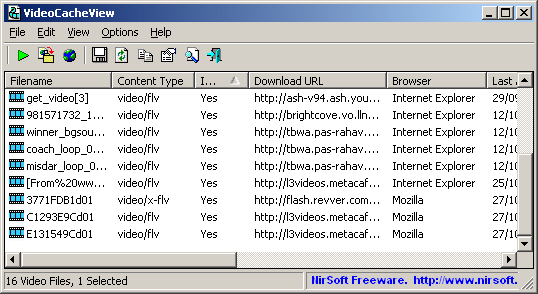
To be able to do this...first download VideoCacheView. "Don't worry the size is just about 78kb". Scroll down the page to download the .zip file. Just run it and it will show a list of video files that already exist in your browser cache. In this case, we need to find out the file where extension is ".tmp".


Click on that file and then save it using save button/ "copy selected files to"(second button located in standard toolbar). That’s it. Don’t forget to note down where you saved it. Just rename the file to whatever you want...


Note, you can play selected video on VideoCacheView to make sure the video you going to save is the right one (there is a play button located on standard toolbar).

jux comment below...